You have logs. Every automation platform gives you logs.
But when your client calls to say their data hasn't updated in two days, you open those logs and start searching manually — trying to piece together what went wrong, when, and why.
That's not a monitoring system. That's a debugging session you're having too late.
The Problem
Logs and monitoring are not the same thing.
Logs are a record of what happened. Monitoring is a system that tells you when something wrong is happening — in real time, automatically, without someone having to look.
Most automation teams have logs. Almost none of them have monitoring in any meaningful sense.
The gap between those two things is where production incidents live. Workflows fail silently. Data goes missing. AI agents loop for hours. And the first signal is a client email, not an internal alert.
Building a real monitoring system means bridging that gap — transforming passive log data into active, real-time alerts.
Why It's Hard to Get Right
Building automation monitoring that actually works requires solving three problems that most teams get wrong.
Problem 1: You're monitoring the wrong thing
Most teams start by monitoring execution status — did the workflow run? That's the easy thing to instrument. But execution status is the least useful signal.
A workflow that ran and produced nothing is indistinguishable from a workflow that ran correctly — from the execution status perspective. The thing you actually care about is outcomes: did the workflow produce the expected result?
Problem 2: You're alerting too late
Email digests. Daily dashboard reviews. End-of-day log checks.
These are lagging indicators. By the time you review them, the failure has already compounded. If a workflow fails at 2am and you check logs at 9am, that's seven hours of undetected failure.
Real monitoring fires when the anomaly occurs — not when you remember to check.
Problem 3: Your alerts have no context
A bare "workflow failed" Slack message is almost useless. Which workflow? What stage? What data was being processed? What's the impact?
An alert without context creates a debugging session every time it fires. That's expensive. Good alerts carry enough information to either act immediately or escalate correctly.
Real Example
A productized service company delivers weekly performance reports to 30 clients. The reports are generated by an n8n workflow that pulls data from five APIs, formats it, and emails a PDF.
Their monitoring: Slack notifications for n8n errors, and a shared responsibility for "someone check the logs Monday morning."
On a Wednesday night, one of the five APIs changes its authentication protocol. The workflow fails on step 3, every run, for every client. The error doesn't surface in n8n because the API returns a 200 with an error embedded in the JSON body — not an HTTP error code.
Monday morning, someone checks the logs. The workflows "ran" correctly. But the reports were generated with missing data.
30 clients received broken reports. The fix took one hour. The discovery took 5 days.
This company had logs. They did not have monitoring.
What a Real Monitoring System Looks Like
A real automation monitoring system has four components:
1. Outcome-based checks, not execution-based checks
For each critical workflow, define what success looks like: minimum record count, downstream state, and output structure. These checks run automatically after each execution. If a run passes execution but fails the outcome check, the alert fires.
2. Baseline comparison
Anomaly detection is more powerful than threshold detection for automation monitoring. Instead of alerting only when a workflow fails, alert when a workflow behaves abnormally — faster than usual, slower than usual, processing fewer records than usual.
Baselines take a week of production data to establish. Once they exist, any deviation becomes detectable without manual review.
3. Real-time alerting to the right channel
Alerts need to fire within minutes of the anomaly, not hours. They need to go to a channel someone is actually monitoring. And they need to include enough context to act: workflow name, anomaly type, magnitude, affected clients or data.
4. Coverage across your full stack
Most monitoring setups cover one platform. Production automation stacks span multiple platforms — n8n for orchestration, OpenAI for AI tasks, Zapier for third-party integrations, custom scripts for edge cases.
Your monitoring needs to cover all of them. Gaps in coverage are gaps in protection.
Building the System: Step by Step
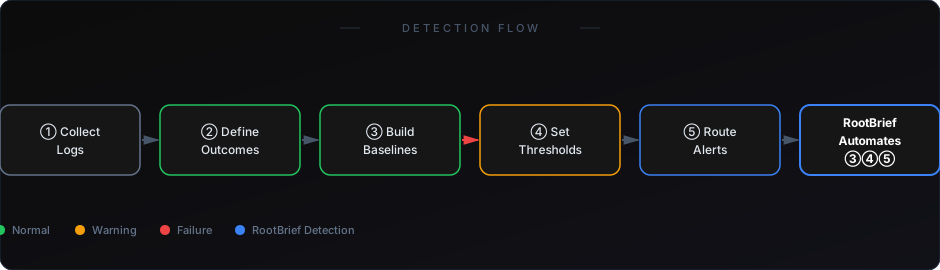
- Inventory your production workflows — List every workflow running in production. Include platform, frequency, and what it affects (client-facing or internal).
- Define success for each workflow — For your top 10 most critical workflows, write down what a successful run looks like. Record count, duration range, downstream state.
- Instrument outcome checks — Add outcome checks to each workflow. This can be custom validation logic, a lightweight script, or a dedicated monitoring tool.
- Establish baselines — Let your instrumented workflows run for 5–7 days. Capture the baseline distribution for each metric. Set your alert thresholds at 2x–3x standard deviation from the mean.
- Connect to your alert channel — Route all alert signals to a single, actively monitored channel (Slack, PagerDuty, or similar). Include workflow name, anomaly description, and severity in every alert.
RootBrief handles steps 3 through 5 automatically. It connects to your automation environment, instruments outcome checks, builds baselines from production data, and routes anomaly alerts to your chosen channel — without requiring you to write and maintain custom monitoring logic.
If you're already running workflows in production, you need visibility — not just logs.
What This System Catches
Once properly built, this monitoring system catches:
- Silent workflow failures (runs that complete but produce no output)
- Partial data failures (workflows that process fewer records than expected)
- Data quality degradation (output that doesn't match expected schema)
- Cost spikes (AI agent runs that consume abnormal token volumes)
- Cross-platform failures (data that doesn't arrive in downstream systems)
- Baseline deviations (workflows behaving differently than their historical pattern)
This is the full failure surface for production automation. Logs capture none of it proactively. Monitoring covers all of it.
See the 7 real reasons n8n workflows fail — and what to monitor
Learn what a lightweight monitoring stack looks like under $50/month
Logs are a debugging tool. Monitoring is a protection system.
The difference matters when something goes wrong in production at 3am and you need to know within minutes — not Monday morning.
Building real monitoring for automation takes a few hours. The cost of not having it is measured in client relationships, revenue, and cleanup time.
Your next production failure is already in motion somewhere in your stack. The only question is whether you'll find it first.