The client didn't get their report. The CRM hasn't updated in 48 hours. The Slack message that should have fired at 9am still hasn't arrived.
You check your automation platform. Everything shows green.
This is a silent failure. And it's more dangerous than any error you've ever debugged, because you don't know it's happening.
The Problem
Silent failures occur when automation runs successfully — by every metric the platform tracks — but produces no useful outcome.
The workflow didn't crash. The API didn't return an error. The nodes executed in sequence. The run completed. And yet: nothing happened.
Data wasn't moved. Reports weren't generated. Clients weren't notified.
The gap between "the workflow ran" and "the workflow worked" is where silent failures live. And every automation platform has this gap — because platforms track execution, not outcomes.
Why It's Hard to Catch
Silent failures are hard to detect because they require you to know what should have happened — and compare it against what did.
Most monitoring tools only know what happened.
Error-based alerts — Only fire when the system detects an error. Silent failures, by definition, don't produce errors. The alert never fires.
Log review — Shows you what ran. Doesn't show you what was supposed to happen. Comparing logs to expected outcomes requires manual effort and domain knowledge that can't be automated without extra tooling.
Uptime checks — Confirm the automation platform is online. Don't confirm it's doing anything useful.
Execution status dashboards — Show green checkmarks on every run. Green means "no exception was raised." It does not mean "this workflow did its job."
Every conventional tool tells you about errors. None of them tell you about absence.
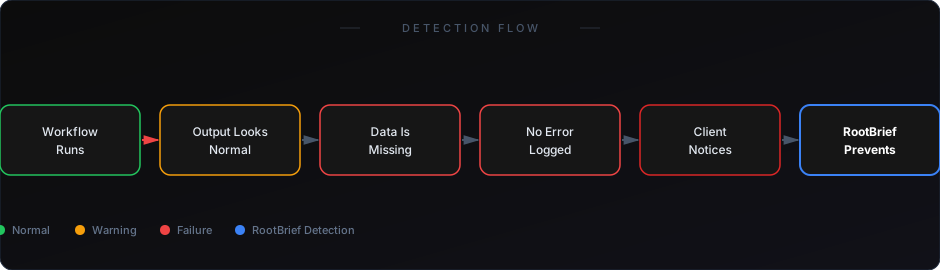
Real Example
A digital agency runs client reporting workflows every weekday morning. One client receives a daily PDF summary generated from CRM data.
A CRM API permission change causes the data fetch to return an empty array — no error, just no data. The PDF generation step runs on empty data. It produces a blank report. No exception fires.
The agency's Slack alert doesn't fire. Their n8n error workflow doesn't fire. Their uptime monitor shows green.
The client opens Monday's PDF. It's blank. Then Tuesday's. Also blank. On Wednesday they send an email asking what's wrong.
Three days of client-facing failure. Zero internal alerts.
The fix took 10 minutes. The detection took 72 hours — and required the client to do it.
Why Existing Solutions Fall Short
Building custom validation logic into every workflow — Technically works, but requires you to anticipate every failure mode in advance. Silent failures are often caused by conditions you didn't predict. And every time you modify a workflow, you risk breaking your validation logic.
Third-party log aggregators — Good for debugging after you know something went wrong. Not designed for proactive anomaly detection.
Email/Slack error handlers — Platform-native handlers fire on platform-detectable errors. Silent failures bypass them entirely.
Manual daily checks — The only approach that actually catches silent failures — but it requires a human to do it every day, on every workflow, and to know what "correct" output looks like for each one. That's not a monitoring system. That's a full-time job.
What Actually Works
Catching silent failures requires monitoring at the output level, not the execution level.
You need to define what success looks like for each workflow — not just "did it run" but "did it produce the right result." Then you need a system that checks every run against that definition automatically.
The key signals to monitor:
- Record count deviation — If a workflow normally moves 200 records per run and today it moved 0, that's a signal. If it moved 3, that might also be a signal. Baseline comparison catches both.
- Execution duration anomaly — A workflow that normally takes 45 seconds but today completed in 2 seconds almost certainly skipped processing. Duration is a proxy for work done.
- Downstream data freshness — Did the system that should receive data actually receive updated data? If your database hasn't been updated in 25 hours and the workflow runs every 24 hours, something failed.
- Output schema validation — Did the output contain the expected fields and data types? Empty strings, null values, and malformed structures are silent failure signatures.
RootBrief monitors all of these signals automatically. It builds baselines from your actual production runs, then flags deviations in real time — before clients see the impact.
If you're already running workflows in production, you need visibility — not just logs.
How to Start
The fastest path to catching your first silent failure:
Step 1 — Identify your three most client-critical workflows.
Step 2 — For each workflow, define what a successful run looks like: minimum record count, expected duration range, downstream systems that should be updated.
Step 3 — Add monitoring that compares each run against those definitions and alerts immediately on deviation.
You don't need to boil the ocean. Start with three workflows and expand from there.
See why n8n's native monitoring misses silent failures
Learn how to build a full monitoring system from logs to alerts
Silent failures don't announce themselves. They accumulate quietly, run after run, until a client calls or an audit reveals the gap.
By then, the damage is done. The question is always: how long has this been happening?
The answer is always longer than you'd want.
Build monitoring that catches silent failures before they reach your clients. Because your clients will find them either way — the only variable is whether you find them first.