You're running automations in production. You have real clients. You can't afford a monitoring incident.
You also can't afford a $500/month observability platform designed for engineering teams ten times your size.
Here's what actually works for early-stage startups — under $50/month total — and which pieces you actually need.
The Problem
Most startup teams start with zero monitoring and graduate to over-engineered monitoring after a painful incident.
The gap between "no monitoring" and "enterprise monitoring" is where most small teams get stuck. They know they need something. They don't know what "something" looks like when you have three engineers and a production stack that includes n8n, a handful of AI agents, and a few Zapier workflows.
The result: they either spend money on tools they don't need, or they skip monitoring entirely and find out about failures from clients.
Both are expensive in different ways.
Why It's Hard to Get Right
The monitoring market is built for scale. The tools that dominate the space — Datadog, New Relic, Splunk — are priced and designed for companies running microservices on Kubernetes.
For a startup running automations, you have different needs:
You need output monitoring, not infrastructure monitoring — Your biggest risks aren't server outages. They're workflows that run but produce nothing, agents that loop and burn tokens, and data that arrives empty. Standard infrastructure monitoring doesn't see any of this.
You need alerting, not dashboards — You don't have time to review dashboards every morning. You need alerts that tell you when something is wrong, so you can ignore monitoring when things are fine.
You need low maintenance — Every monitoring tool that requires ongoing configuration is a tool you'll stop maintaining within three months. Your stack needs to be simple enough to survive your team's attention budget.
You need affordable entry points — Tools that charge $500/month before you've validated your business are the wrong tools.
Real Example
A two-person startup runs client workflows in n8n and uses Claude to process support tickets. They have seven paying clients. Monthly tool budget: $200.
For months, their monitoring strategy was checking the n8n dashboard once a day and hoping nothing was wrong. One Thursday, a workflow started returning empty responses at 2am. By the time they checked Friday morning, six clients had received empty reports.
The fix took 20 minutes. The cleanup took three days.
After the incident, they built a proper lightweight stack in one afternoon — at under $40/month. They haven't had an undetected client-facing failure since.
What a Lightweight Stack Actually Looks Like
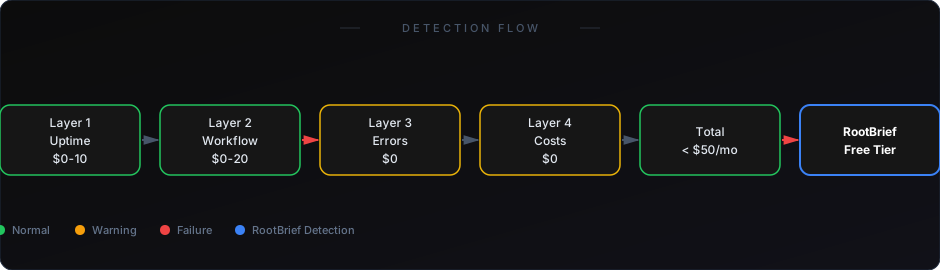
Layer 1: Uptime & Heartbeat Monitoring (~$0–$10/month)
What it does: Confirms your automation platform is running and your scheduled workflows are firing.
What to use: Healthchecks.io — free tier covers most startup needs, paid plan starts at $20/month. Alternatively, BetterStack's free tier works for basic heartbeat checks.
What it catches: Server downtime, missed scheduled runs, complete workflow failures.
What it misses: Silent failures, empty outputs, quality degradation, cost spikes.
Layer 2: Workflow Output Monitoring (~$0–$20/month)
What it does: Checks whether your workflows produced expected outputs — not just whether they ran.
What to use: RootBrief — designed specifically for automation output monitoring. Monitors record counts, execution baselines, and data freshness across your n8n, Zapier, and AI agent stack.
What it catches: Empty outputs that pass as success, anomalous execution times, baseline deviations, silent data failures.
Why it's essential: This is the layer everything else misses. If you only pick one paid monitoring tool, this is it.
Layer 3: Error Alerting (~$0/month)
What it does: Routes platform-detected errors to a channel you'll actually see.
What to use: Slack (free) + your platform's native error handlers. n8n's error workflow feature, Zapier's error Zaps, Make's error scenarios — all routed to a dedicated Slack channel.
What it catches: Explicit errors your platform knows about.
What it misses: Silent failures (see Layer 2).
Layer 4: Cost Monitoring (~$0/month)
What it does: Alerts when AI agent token consumption spikes beyond your budget threshold.
What to use: OpenAI billing alerts + Anthropic spending limits + run-level cost logging through RootBrief.
What it catches: Budget overruns, runaway agent loops, token-heavy edge cases.
Total Cost Breakdown
If you're already running workflows in production, you need visibility — not just logs.
How to Set It Up
Day 1 (30 minutes):
- Set up Healthchecks.io for your three most critical scheduled workflows
- Create a dedicated #alerts Slack channel
- Configure your platform's native error handler to post to that channel
Day 2 (1 hour):
- Connect RootBrief to your n8n or automation environment
- Let it run for 3–5 days to establish baselines
- Set alert thresholds once baselines are established
Day 3 (15 minutes):
- Configure OpenAI and Anthropic billing alerts at your monthly ceiling
- Set per-run cost thresholds in RootBrief
That's your full monitoring stack. It takes less than two hours to set up and costs under $50/month.
See how silent automation failures happen — and how to catch them
Learn why n8n's native monitoring leaves gaps you need to fill
You don't need enterprise monitoring to protect your production automations. You need the right layers — uptime confirmation, output validation, error routing, and cost controls.
Each layer is cheap or free. Together they catch every major failure category that kills client relationships and burns budgets.
Set it up before your next incident. Not after.