Your n8n workflow passed every test. You pushed it live. It ran fine for a week.
Then your client called asking why their data hasn't updated in three days.
You check the logs. No errors. No alerts. Nothing — the workflow shows as "success." But nothing actually happened.
The Problem
n8n workflows fail silently more often than most teams realize.
A webhook stops firing. An API returns a 200 status but delivers empty data. A downstream node skips execution without throwing a single error.
The run completes in two seconds instead of forty-five. n8n marks it green. You get no notification. Your client's dashboard freezes — and you're the last to know.
By the time anyone notices, hours or days of data are already missing. Sometimes more.
Why It's Hard to Catch
n8n's built-in error handling catches explicit failures — crashed nodes, missing credentials, bad HTTP responses.
It does not catch:
- Partial data returns (API responds with
[]— empty, but technically valid) - Conditional branches that silently skip under edge-case data
- Timeouts that kill a node without raising an exception
- Rate limit loops that appear to complete but moved zero records
- Third-party APIs that return 200 with malformed or truncated payloads
Slack alerts and email notifications only fire when n8n knows something went wrong. If n8n thinks everything is fine, you get nothing. And that's the danger.
Real Example
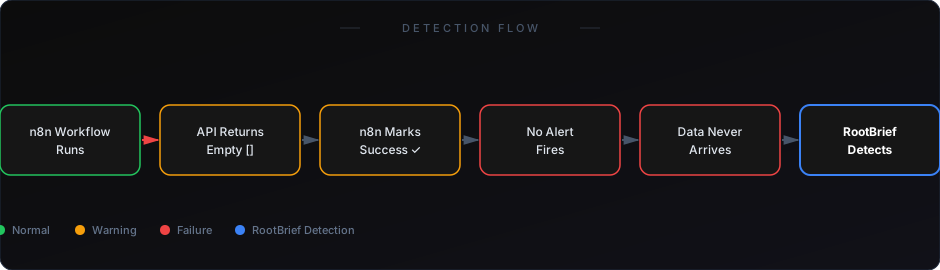
A SaaS team runs a nightly CRM-to-data-warehouse sync using n8n. The Salesforce API starts returning throttled responses — technically valid, but empty arrays instead of records.
n8n logs it as successful. The workflow completes in under two seconds instead of forty-five. No alert fires.
Three days later, the ops team notices the dashboard hasn't updated. The workflow "ran" 72 times. It moved zero records.
This is a silent failure. It's not caught by logs. It's not caught by error handlers. It's only caught when someone manually audits the output.
At that point, you're already in damage control mode.
Why Existing Approaches Fall Short
Checking logs manually — Doesn't scale. You're looking for the absence of data, not the presence of an error. Logs show you what happened. They don't tell you what should have happened.
n8n error workflows — Only trigger on actual exceptions. Silent completions with empty output are invisible. These workflows are reactive, not proactive.
Slack notifications — You can only alert on what n8n knows to alert on. It doesn't know what it doesn't know.
Basic uptime monitoring — Confirms n8n is running. Not whether your workflows are producing correct, expected output.
None of these tools are designed to detect output-level failure. That's the gap.
What Actually Works
You need output-level monitoring — not just process-level monitoring.
This means tracking expected record counts per run, flagging runs that complete faster than your established baseline, monitoring data freshness downstream, and alerting when a connected system hasn't received an update within a defined window.
RootBrief sits between your automation layer and your operations team. It watches what workflows produce — not just whether they ran. When a workflow completes but moves no data, RootBrief flags it as anomalous, even if n8n logged it as successful.
You get visibility into the gap that every other tool leaves open.
If you're already running workflows in production, you need visibility — not just logs.
The 7 Real Reasons Your n8n Workflow Fails
- Empty API responses treated as success — The API returns 200 with
[]. n8n sees no error and moves on. Your data never arrives. - Webhook delivery failures — The trigger never fires. The workflow never starts. No error surface anywhere.
- Conditional branch routing errors — Your IF node routes incorrectly under edge-case input data. Entire branches are silently skipped.
- Rate limiting loops — The workflow retries silently and eventually times out without surfacing an exception.
- OAuth token expiry mid-run — Credentials expire partway through a long workflow. Some nodes execute, others silently skip.
- Downstream service degradation — External APIs respond but return malformed, truncated, or stale data. n8n can't distinguish this from a valid response.
- Node timeout silences — A node hangs and gets killed by the runtime. No exception is thrown. The workflow marks as complete.
Every one of these looks like success in your logs. None of them are.
How to Start
You don't need to rebuild your automation stack. You need a monitoring layer on top of what you already have.
Start by identifying your three highest-risk workflows — the ones where silent failure causes the most client-facing damage. Add output-level checks to those first.
From there, expand coverage as your team builds confidence in what "healthy" actually looks like.
Learn how to catch silent failures before clients notice
See why n8n error handling alone isn't enough
Silent failures are the hardest bugs to address — because you don't know they're happening until someone else tells you.
Your n8n setup might be running right now, logging clean successes, and failing your clients at the same time. Logs won't tell you. Slack alerts won't tell you. Your error workflows won't tell you.
The question isn't whether your workflows will fail. It's whether you'll find out before your clients do.