You deployed your OpenAI-powered agent. It works. Your team is shipping.
But production is different from staging. In production, the agent runs on real user data, under real load, with real consequences.
And there are at least seven things it can fail at silently — right now — that your current monitoring won't catch.
The Problem
OpenAI agents in production fail in ways that don't surface as errors.
A loop that consumes $50 in tokens before timing out doesn't throw an exception. A response that returns plausible but factually wrong content doesn't trigger an alert. A tool call that fails quietly on the third retry doesn't notify anyone.
Production agents operate at the intersection of LLM behavior, API dependencies, and user-facing expectations. Each layer has its own failure modes. Most teams monitor one layer. They miss the other two.
By the time the failure is visible, you've already paid for it — in compute costs, in user trust, or in operational cleanup.
Why It's Hard to Catch
OpenAI's API is reliable. That's actually part of the problem.
When the API returns a 200 response with a plausible completion, your infrastructure sees success. But "plausible" isn't "correct." Your monitoring layer can't read the response and evaluate whether it served the user's actual need.
Token consumption is invisible per-run — OpenAI's dashboard shows aggregate usage. It doesn't show you which specific agent runs consumed 10x more tokens than baseline. Without run-level cost tracking, you can't identify which agent is costing you money.
Loop behavior isn't an error — An agent repeatedly calling a tool because it can't make progress looks like normal activity. Without call-count monitoring per run, you won't see it.
Tool failure retry behavior — When a tool call fails, agents often retry. The retry behavior itself consumes tokens and can mask the root cause. Most logging setups capture the final response, not the intermediate retry chain.
Context window exhaustion — When an agent runs out of context, it either truncates silently or errors out. Truncation is worse — the agent continues with incomplete context, producing confidently wrong output.
Real Example
A startup uses an OpenAI agent to generate personalized onboarding emails for new users. The agent pulls user data, generates a draft, and queues it for sending.
A schema change in their user database causes the agent to receive empty profile fields. The agent still generates an email — it just fills in placeholders with generic text. The API returns 200. The email queues.
Over three days, 400 users receive obviously impersonal onboarding emails that say things like "Hi [Name], welcome to our product!" — with literal brackets.
No alert fired. No error logged. The agent "succeeded" 400 times.
The damage: 400 poor first impressions, a spike in unsubscribes, and a customer success team manually re-sending corrected emails for a week.
Why Existing Solutions Fall Short
OpenAI usage dashboard — Shows aggregate token spend by model and time period. No per-run breakdown. No anomaly detection. No output quality signal.
Application-level try/catch — Catches API exceptions. Doesn't catch semantically wrong responses or silent quality degradation.
Basic logging — Captures prompts and completions. Doesn't alert on anomalies. Requires someone to actively review logs to notice problems — which doesn't happen in production at scale.
Rate limit alerts — Fire when you hit API limits. By the time you're hitting limits, you've already overspent.
Production Monitoring Checklist for OpenAI Agents
Use this checklist before any OpenAI agent goes live:
Cost monitoring
- Per-run token usage tracked and compared against baseline
- Alert configured for runs exceeding 2x average token consumption
- Daily cost ceiling alert set at the agent level
Loop detection
- Tool call count per run logged
- Alert configured when any single run exceeds N tool calls (set your own threshold)
- Run duration anomaly detection enabled
Output quality
- Output schema validation in place (required fields present, correct data types)
- Empty or near-empty output detection configured
- Human review sample rate defined for production output
Error handling
- Tool failure retry chain logged (not just final outcome)
- Context window usage tracked per run
- Fallback behavior tested and validated
Availability
- OpenAI API latency monitoring in place
- Degraded response time alerting configured
- Fallback model or graceful degradation path defined
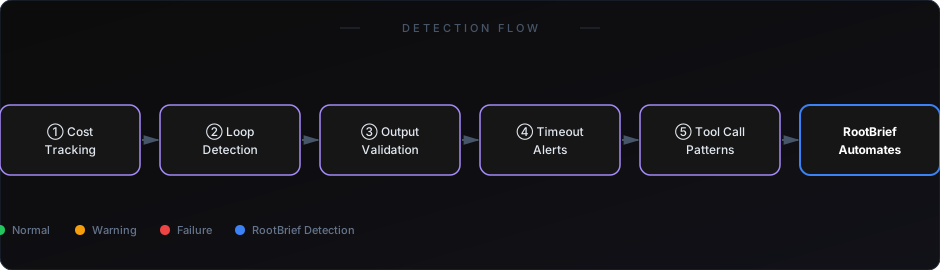
RootBrief handles the monitoring layer for each item on this checklist automatically. You define your baselines and thresholds once. RootBrief watches every run and alerts you when anything deviates.
If you're already running workflows in production, you need visibility — not just logs.
How to Start
Pick the two most expensive and most user-facing agents you're running. Start monitoring those first.
For each agent, define: what does a normal run cost in tokens? How many tool calls is normal? What does valid output look like?
Once you have those baselines, any deviation becomes detectable.
See how AI agent costs spike — and how to detect it early
Learn what actually breaks when AI agents go to production
OpenAI agents in production aren't just an engineering problem. They're an operations problem.
The failures that matter most — cost overruns, quality degradation, silent loops — don't announce themselves. They accumulate quietly until they're impossible to ignore.
A monitoring checklist is the first step. An automated monitoring system is what makes that checklist scale.