You shipped your AI agent. It worked perfectly in staging.
Three days later, it's been silently looping the same task for six hours, billing you $400 in tokens, and your users still haven't received their output.
This is what production failure looks like for AI agents. It doesn't throw an error. It just keeps running.
The Problem
AI agents fail differently from traditional software. A crashed API throws an exception. An agent in a failure state often just… continues.
It retries a subtask it can't complete. It calls the same tool repeatedly with slightly different parameters. It generates output that looks valid but is semantically wrong. It times out after consuming maximum tokens and leaves no useful trace in your logs.
None of these failures surface as errors. They surface as silence, cost overruns, and user complaints.
And by the time they're visible, they've already caused damage.
Why It's Hard to Catch
Traditional monitoring watches for crashes. AI agent failures are subtler:
- Loop detection is hard — An agent calling a tool 200 times in 10 minutes doesn't look like an error. It looks like a busy agent. Without baseline comparison, you can't tell the difference.
- Output quality is invisible to infrastructure — Your server sees a successful HTTP response. It doesn't know the agent returned a hallucinated answer, a malformed JSON blob, or a response in the wrong language.
- Cost spikes happen fast — Token usage can spike 10x in minutes. By the time your billing alert fires, the damage is done.
- Timeout behaviors vary — Some agent frameworks silently truncate at token limits. Others loop indefinitely. Both look like normal operation to your infrastructure layer.
- Tool call failures are often swallowed — If your agent calls an external API and it fails, many frameworks retry silently. You see continued execution. You don't see repeated failure.
Real Example
A startup runs an AI agent that processes customer support tickets. The agent calls a classification tool, then routes to a response template.
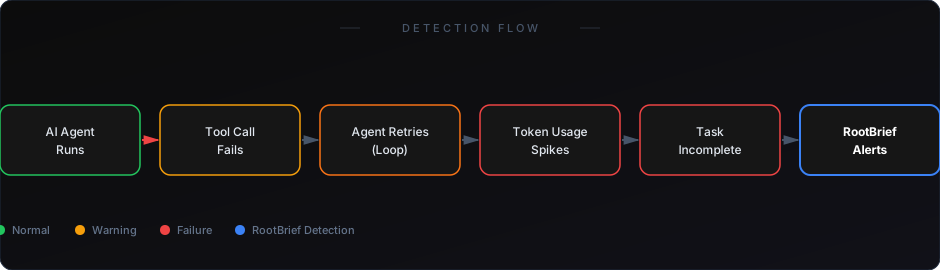
The classification API starts returning timeouts. The agent retries. Each retry consumes tokens. After 40 retries over 20 minutes, the agent exceeds its context window and terminates — without ever processing the ticket.
The ticket remains open. The customer is waiting. Your support SLA is breached. Your logs show the agent "ran" successfully for 20 minutes.
You find out when the customer escalates. That's too late.
Why Existing Solutions Fall Short
APM tools (Datadog, New Relic) — Great for infrastructure. They see latency, error rates, throughput. They don't understand what an agent is supposed to do or whether it did it correctly.
LLM provider dashboards — Show you token usage in aggregate. Can't tell you which agent run is anomalous, or why.
Logging frameworks — Capture what happened. Don't detect that what happened was wrong, repeated, or incomplete.
Manual review — Doesn't scale past a handful of agents. The moment you have more than five agents running concurrently, manual review becomes a full-time job.
None of these tools understand agent behavior at the task level. That's what's missing.
What Actually Works
Agent-level monitoring needs to track four things:
- Task completion rate — Did the agent finish the job it was given? Not "did it run" — did it complete?
- Tool call patterns — Is this agent calling the same tool more times than baseline? That's a loop signal.
- Token usage per task — Is this run consuming 10x the normal tokens? That's a cost and quality signal.
- Output validation — Did the output meet expected format, length, and content criteria?
RootBrief monitors all four at the run level — not just aggregate stats. When an agent starts looping, when costs spike on a single task, or when output quality drops below threshold, RootBrief fires an alert before the damage compounds.
You get a real-time view of what each agent is doing, not just whether the infrastructure is up.
If you're already running workflows in production, you need visibility — not just logs.
How to Start
Start with your highest-throughput agent. The one that handles the most tasks per day.
Instrument it with three metrics: task completion rate, average token usage per task, and tool call count per run. Set baseline thresholds from your first week of production data.
Anything that deviates by more than 2x from baseline should trigger an alert.
That's the minimum viable monitoring setup for any AI agent in production.
Learn how to catch silent automation failures before clients notice
See why AI agent costs spike — and how to detect it early
AI agents in production fail in ways traditional monitoring wasn't built to catch. They don't crash. They drift. They loop. They hallucinate. They consume resources and return nothing useful.
The teams that get burned are the ones who assumed their infrastructure monitoring was enough.
It isn't. You need agent-level visibility — or your next production incident is already counting down.