You set up n8n's error workflows. You added Slack notifications. You built a custom logging node.
You thought you were covered.
Then a workflow ran 50 times over two days and processed zero records — and nobody knew until a client asked why their report was empty.
The Problem
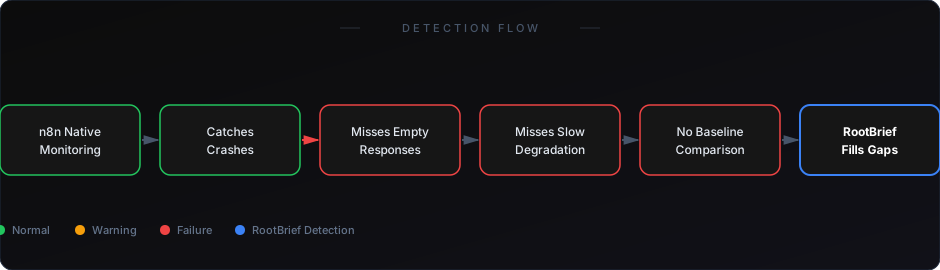
n8n's built-in monitoring is designed to catch execution failures. It is not designed to catch operational failures.
There's a critical difference. An execution failure means something in n8n broke. An operational failure means the workflow ran correctly but produced no useful outcome.
n8n can only report on what it measures. It measures: whether nodes executed, whether HTTP responses were received, whether credentials authenticated. It does not measure: whether the data that arrived was correct, complete, or meaningful.
That gap is where your most expensive production problems hide.
Why It's Hard to Catch
The limitations of n8n's native monitoring become real the moment you scale.
Error workflows only trigger on exceptions — If a node throws an error, your error workflow fires. If a node succeeds but returns empty data, nothing happens. The exception handler never sees it.
Execution history doesn't show output quality — n8n logs whether each node ran. It doesn't log whether what each node produced was correct. You'd need to build custom logging into every workflow to capture that — and maintain it manually.
No anomaly detection — n8n has no concept of "this workflow usually takes 45 seconds but today it ran in 2 seconds." That kind of baseline deviation is your best signal for silent failure. n8n doesn't track it.
Retention is limited — Execution history retention in n8n is bounded. For high-frequency workflows, older runs disappear before anyone reviews them. Auditing becomes impossible.
No cross-workflow visibility — When a workflow feeds into another workflow, n8n has no native way to track whether data successfully flowed end-to-end. Each workflow is an island.
Real Example
An agency runs client reporting workflows in n8n. Each night, data is fetched from five different APIs and assembled into a Google Sheet.
One of the APIs starts returning paginated results with an offset bug — page 1 always returns correctly, but subsequent pages return duplicates of page 1.
n8n sees 5 successful API calls. The workflow completes. The sheet gets populated — with the same records, repeated five times. No error fires. No alert triggers.
The client reviews the report three days later. The data is wrong. The agency loses the account.
This failure is invisible to every native n8n monitoring tool. It's only visible at the output level — which n8n doesn't inspect.
Why Existing Solutions Fall Short
Custom logging nodes — You can build them, but you have to build and maintain them in every workflow. One workflow change can break your logging without you noticing. This approach doesn't scale and creates a secondary maintenance burden.
n8n execution history — Shows node-level success/failure. Doesn't show data quality. Doesn't alert. Doesn't aggregate across workflows.
Slack error alerts — Reactive, not proactive. By definition, they only tell you about errors n8n has already identified. The silent failures — the ones n8n doesn't identify — never appear in Slack.
External cron monitors (like Healthchecks.io) — Confirm that a workflow ran. Can't confirm that the workflow did anything useful.
Each of these tools patches a small part of the problem. None of them solve it.
What Actually Works
Dedicated monitoring for n8n means observing outputs, not just executions.
You need a system that knows: how many records should this workflow process per run? How long should it typically take? What should be present in the downstream system after it completes?
RootBrief connects to your n8n environment and builds execution baselines automatically. When a run deviates — too fast, too slow, zero records, unexpected output format — it flags the anomaly in real time, before the downstream impact compounds.
You don't need to modify your workflows. You don't need to build custom logging. You add the monitoring layer on top.
If you're already running workflows in production, you need visibility — not just logs.
How to Start
The fastest way to identify your monitoring gaps is to audit your three most business-critical n8n workflows and ask: if this workflow ran successfully but moved zero data, would anyone know within one hour?
If the answer is no, that workflow is unmonitored in any meaningful sense.
Start there. Add output-level checks to those workflows first — either through RootBrief or through manual validation logic — before expanding coverage.
See the 7 real reasons n8n workflows fail in production
Learn how to build a real monitoring system for automation
n8n's built-in monitoring is a starting point, not a finish line. The moment you have workflows running in production for real clients, you've outgrown it.
The failures that matter most — the ones that damage client relationships and cost you revenue — are exactly the ones n8n's native tools are blind to.
You need output-level visibility. Anything less is a gap you're leaving open.